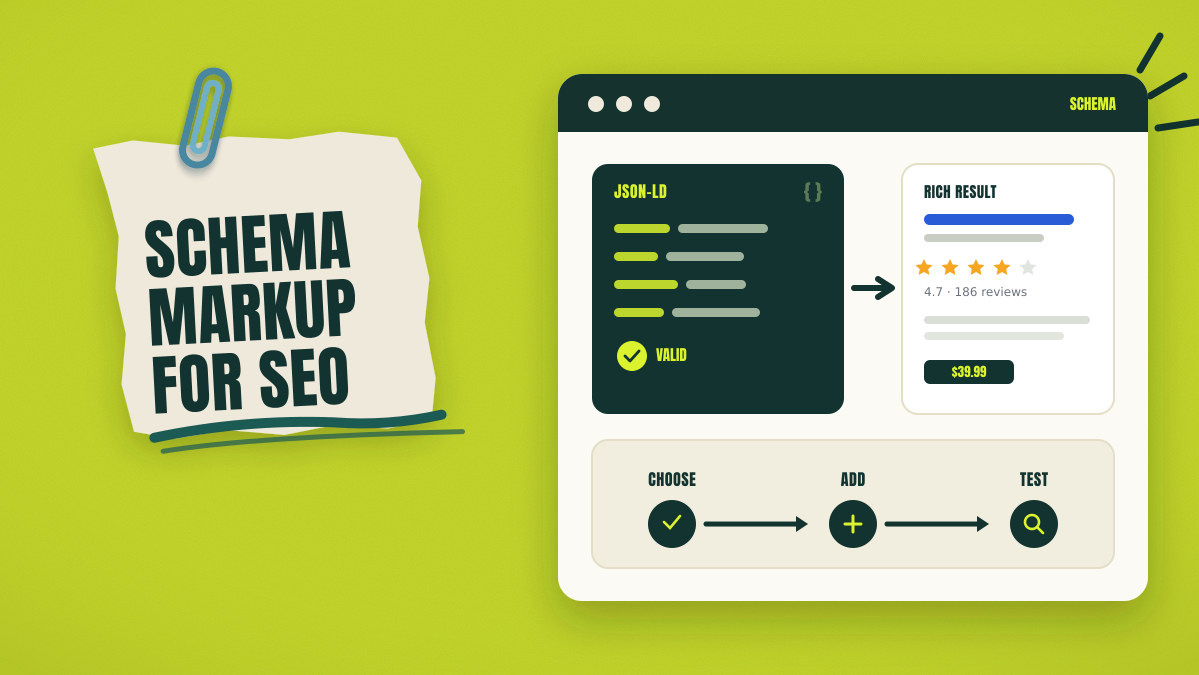
Start schema markup for SEO with an audit of existing page output. A theme may already publish Article markup across every post. Another plugin may publish BlogPosting with different dates and identifiers. Adding new code can create more conflicts on that page.
One page, three article descriptions
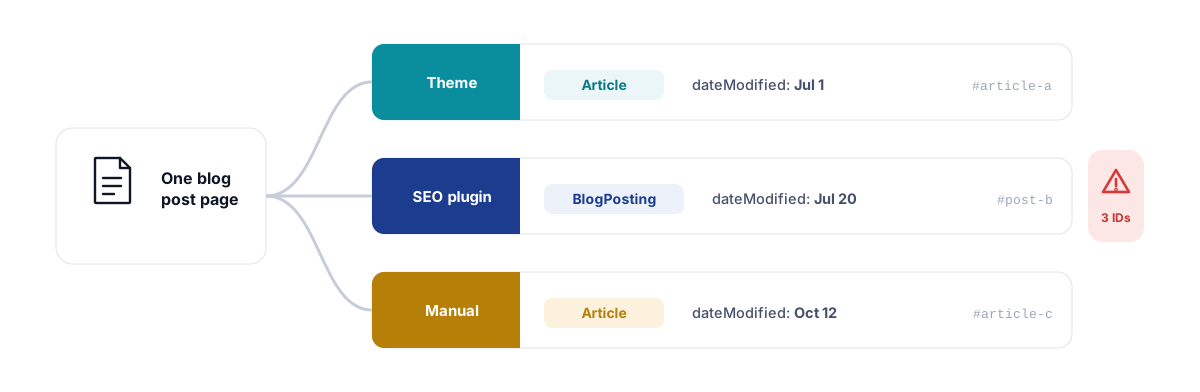
The page now describes one article through three separate entity IDs. Another generated block would increase conflicts between those descriptions. The process starts with inspection, then moves through selection and testing.
Schema markup labels page entities and visible facts through named properties. Google can use those labels when reading content and building rich results, though Google still chooses the result format shown for each query.
What Is Schema Markup for SEO?
Schema markup describes page entities through named types and properties. The code helps software identify subjects, facts, and connected information. Schema.org supplies the shared type and property list behind most Search setups.
Schema markup
Schema markup labels facts about the primary subject of a page. Those labels describe names, dates, prices, addresses, authors, or products.
Schema.org
Schema.org lists shared types, property names, and allowed value formats. Google Search supports only part of that complete list. Schema.org published version 30.0 on March 19, 2026.
JSON-LD
JSON-LD stores schema data inside a script block. The @context value identifies the Schema.org type and property list. The @type value names the entity category represented there. Other properties describe visible facts and related entities.
Rich result
A rich result contains extra visual or interactive Search information. Google may display prices, dates, ratings, images, or event details. Valid markup can qualify without creating a display promise.
A schema type names the category assigned to an entity. A schema property records one fact about that entity. An entity ID provides repeated mentions one stable reference. Eligibility describes when a page can qualify for Search features.
The main entity is the main thing described on the page. Supporting entities describe related people, products, places, or offers.
Google supports JSON-LD, Microdata, and RDFa across Search features. JSON-LD keeps schema code separate from visible HTML content, and Google permits it within the HTML head or body.
How Important Is Schema Markup for SEO?
Schema markup can help Google read pages and qualify richer results. Schema markup cannot promise rankings, visibility, traffic, or rich-result display.
Accurate markup identifies the main subject of the page for software systems. Properties label details such as authors, prices, dates, and addresses. Supporting entities can show relationships around the primary page entity. Google may use qualifying data for a richer Search appearance. A richer result may attract more clicks, though outcomes differ across websites.
Code alone cannot earn a higher organic position. Passing every test also cannot force Google result appearances. Schema markup carries no proven universal AI citation increase.
Google publishes several company case studies showing measured Search outcomes. Rotten Tomatoes marked 100,000 pages and reported 25% higher click-through rates. Food Network converted 80% of pages and reported 35% more visits. Rakuten reported 1.5 times longer engagement across marked pages.
Nestlé reported 82% higher click-through rates for rich-result pages. Each figure reflects one company, website, period, and measured condition. Those figures cannot predict results for another website or market.
Schema errors can stop pages from qualifying for Search features. Accurate content, index access, and current Google instructions remain essential.
Audit Existing Schema Markup
Inspect initial HTML and rendered output before creating new markup. Several website systems may already publish schema on the page. First record every type, entity ID, value, and source system. Finish the audit before removing or adding any markup.
Open the page source and search for common schema markers. Look for application/ld+json, @type, @id, itemscope, itemtype, and itemprop.
Rendered HTML shows the final output after browser scripts finish. JavaScript, plugins, widgets, or Tag Manager may add later markup. Compare initial HTML against the final browser output.
For example, page source may contain one BlogPosting node. The rendered page may contain another Article node from JavaScript. Record both blocks and trace the second source before editing.
Trace every detected block to the system that created it. A CMS may publish basic WebPage or Article entities. Themes can add breadcrumbs, publisher details, and article dates. Plugins may publish another graph with separate entity identifiers. Ecommerce systems can add Product, Offer, Brand, and rating data.
Review the following common schema output sources:
- CMS defaults
- Website theme
- SEO plugin
- Ecommerce system
- Review plugin
- Manual JSON-LD
- Server template
- JavaScript component
- Google Tag Manager
Record these fields during the schema markup audit:
- Page URL
- Page template
- Schema type
- Entity ID
- Output source
- Visible page value
- Schema value
- Accuracy status
- Duplicate status
- Required action
Consider one blog post carrying three article nodes. The theme publishes Article with an older modified date. The SEO plugin publishes BlogPosting with the current author profile. Manual JSON-LD adds another Article with another entity ID. The page now contains conflicting identities and changing values.
Record every source before deciding which output should remain. Removal decisions need evidence from both page views.
Define the Page Purpose and Main Entity
Choose schema markup from the main purpose of the page. Use visible facts and visitor actions to confirm that purpose. Each template should describe one primary page subject first. Supporting entities should describe related facts without replacing that subject.
Ask four questions before selecting any schema type:
- What single thing does the page mainly describe?
- What can a visitor do on that page?
- Which facts appear within the visible page content?
- Which entity receives the most page attention?
A blog post mainly describes one article or post. The visitor reads the post and checks its author and dates.
A product page mainly describes one purchasable item. The visitor reviews price, availability, variants, shipping, and return details. The Product entity should remain central across that page.
A location page describes one physical business branch. The visitor needs its address, telephone number, hours, and location details.
Google requires markup to represent visible and relevant page content. The main entity should match the main subject of the page. Supporting nodes should describe connected people, offers, brands, or places.
The main entity statement should remain brief and specific. Example: the page describes one purchasable ceramic water bottle.
Separate Validity, Google Eligibility, and Display
Schema validity, Google eligibility, and rich-result display represent separate outcomes. One successful check cannot confirm the other two outcomes.
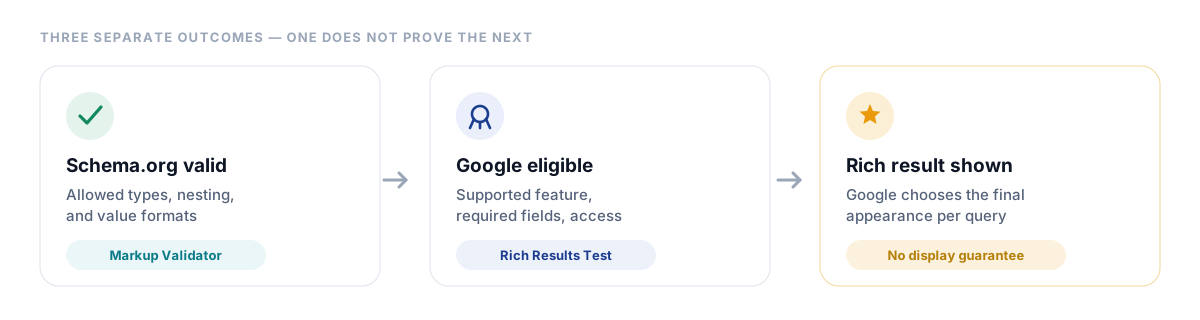
Schema.org validity
Valid markup follows allowed types, nesting, and value formats. Schema Markup Validator checks the extracted Schema.org entities. Valid markup may use types outside current Google support.
Google Search eligibility
Google qualification requires a currently supported Search feature. The page must include required properties for that feature. Googlebot also needs access to the page and resources. Visible content should match every important property value. Policy violations can block qualification despite valid syntax.
Rich-result display
Google chooses the final appearance for each Search result. Correct setup cannot force a rich result appearance. Google may select another feature or standard text result. Query, device, location, and other systems can influence that appearance.
A passing validator result confirms Schema.org syntax within the tested markup. A passing Rich Results Test result supports current Google feature qualification. Neither result guarantees a visible rich result after indexing.
Choose a Current and Specific Schema Type
Schema markup types for SEO should match the primary page entity. Select the narrowest accurate type after checking current Google support. Page purpose should control the main type and supporting entities. Old plugin menus cannot replace current Google instructions.
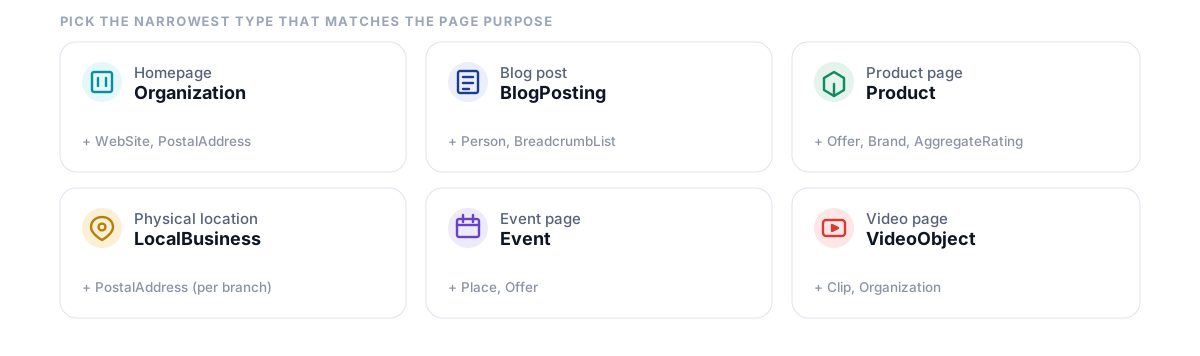
Use these checks before approving the selected type:
- Name the primary page entity.
- Open the current Google Search appearance list.
- Open the relevant Google type instructions.
- Review available Schema.org subtypes.
- Select the narrowest accurate type.
- Add supporting entity types separately.
Google currently lists many supported Search features, including Article, Product, Local Business, Event, Recipe, and Video. Google last updated its Search appearance overview on June 15, 2026.
| Page purpose | Primary type | Supporting types | Main data source | Main risk |
|---|---|---|---|---|
| Homepage | Organization or OnlineStore | WebSite, PostalAddress | Business database | Duplicate organization identities |
| Blog post | BlogPosting | Person, Organization, BreadcrumbList | Editorial CMS | Conflicting authors or dates |
| News page | NewsArticle | Person, Organization, ImageObject | News CMS | Incorrect publication details |
| Product page | Product | Offer, Brand, AggregateRating | Ecommerce database | Price or stock mismatch |
| Product variants | ProductGroup | Product, Offer, Brand | Variant database | Mixed variant identifiers |
| Physical location | Specific LocalBusiness subtype | PostalAddress, Organization | Location database | Several branches inside one entity |
| Event page | Event | Place, Offer, Organization | Event database | Stale dates or status |
| Job page | JobPosting | Organization, Place | Recruitment system | Expired roles remaining active |
| Video page | VideoObject | Clip, Organization | Video platform | Blocked video or thumbnail |
| Dataset page | Dataset | DataCatalog, DataDownload | Data repository | Markup placed on unrelated pages |
Choose Restaurant over broad LocalBusiness for restaurant pages. Choose BlogPosting over broad Article for standard blog posts. Use NewsArticle when the page publishes reported news content. Use ProductGroup when grouped variants share one parent item. Use OnlineStore when the organization operates an online retail website.
Google removed several lesser-used Search features during 2025, covering Book Actions, Course Info, and Claim Review, alongside Estimated Salary, Learning Video, Special Announcement, and Vehicle Listing. Google stated that those visual removals had no ranking impact.
FAQ rich results stopped appearing from May 7, 2026. Old plugin menus may still offer FAQ or retired feature options, so check current Google instructions before approving any setup.
The final choice should produce one main type per template. Supporting types should represent visible and connected page entities.
Map Properties to Visible Page Data
Add properties only when a verified page or database value exists. Every property needs one source, owner, and testing rule.
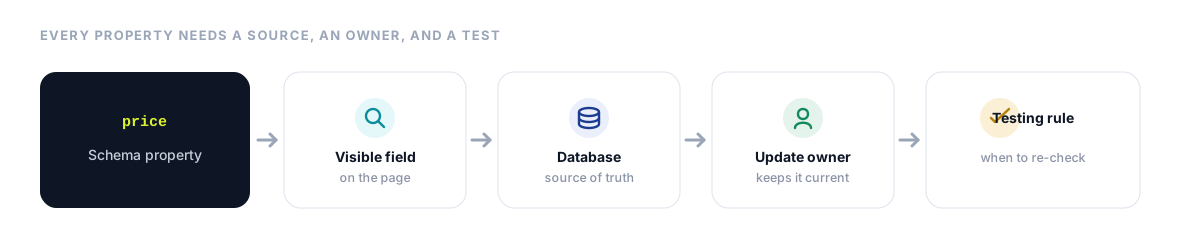
Required properties
Required properties control qualification for specific Google features. Missing required fields can create blocking Search Console errors. Empty values cannot replace accurate required information. Each Google feature page lists accepted property and value types.
Recommended properties
Recommended properties can add useful detail around the main entity. Accuracy should remain more important than property count. Google recommends complete and accurate values over many weak additions.
Other Schema.org properties
Schema.org includes properties beyond current Google feature requirements. Those properties can still help other software read page details. Every additional property should remain accurate and relevant. Extra Schema.org properties cannot create another Google Search feature. Every added value still needs one update owner.
Map product price to the purchase price shown on the page. Map dateModified to a meaningful article update date. Map openingHoursSpecification to the current published branch hours. Map availability to the current purchase state. Map author.url to a page identifying the named author.
Never create missing ratings, reviews, prices, dates, or addresses. Never create identifiers, stock states, or author credentials without evidence. Leave unsupported optional fields absent from the final graph.
A verified property map prevents value conflicts before code creation. It also names the team owning every changing value.
BlogPosting Schema Markup Example
BlogPosting markup should describe the headline, author, dates, image, and publisher. BlogPosting provides a specific type for standard blog posts. Visible page fields should supply every important property value. One stable entity ID should identify the article everywhere.
The page should visibly show the headline, author, publication date, and main image. An author profile should identify the named Person or Organization.
The page describes one main BlogPosting entity. Person and Organization nodes support author and publisher relationships. BreadcrumbList can represent the visible navigation trail on the page. The article ID should remain stable after later content updates. The author URL should open an identifying profile page.
Google supports Article, NewsArticle, and BlogPosting across Article markup. Current Article documentation lists recommended fields without required Article properties, covering author, dates, headline, image, and author identity.
Check every value against visible article content. Confirm each image remains crawlable and representative. Compare published and modified dates against meaningful article updates. Confirm the author profile identifies the named author.
A theme may still publish another Article node. Compare both article IDs, authors, images, and dates. Retain one complete entity and disable conflicting output. Test the final URL after clearing website caches.
The final BlogPosting markup should match the visible post. It should also remain stable across later template updates.
Product and Offer Schema Markup Example
Purchasable product pages need Product markup with one current Offer. The Product describes the item while Offer describes its sale terms. Use the product database for current prices, stock, and availability.
The product page describes a Product connected with one current Offer. The Offer carries price, currency, availability, and seller details.
Google merchant listing instructions require product name, image, and Offer, along with an active price and matching currency. Google supports purchase pages focused on one product or variant group.
Recommended Product properties include brand, description, SKU, and verified identifiers. Offer properties can include availability, condition, shipping, and return details. Use AggregateRating only when visible ratings meet current Google policy. Ratings should match genuine reviews displayed on the product page.
ProductGroup can represent several variants sharing one parent product. Each variant should have accurate identifiers and selectable page values. Variant URLs should open the matching colour, size, or configuration. Prices and stock should match the selected variant. For a Shopify-specific walkthrough of Product and variant JSON-LD, follow our Shopify schema implementation guide.
Product data record
pricecomes from the current product database.priceCurrencycomes from the active market currency.availabilitycomes from the current stock state.- The merchandising team owns all three changing values.
Suppose the visible page shows $39.99 and available stock. The schema graph shows $42.99 and unavailable stock. Fix the product data source that created the wrong Offer. Adding another Offer would create another conflict. Then retest the product after cache refresh.
Google recommends initial HTML Product markup for broad shopping support. JavaScript-generated Product data can reduce crawl reliability for changing prices and stock.
The final Product markup should match the current purchase experience. Database changes should update visible content and markup together.
LocalBusiness Schema Markup Example
Each physical branch needs one specific LocalBusiness entity. Branch markup should describe one location, address, phone number, and hours.
Choose the narrowest accurate LocalBusiness subtype available. Assign every branch one stable entity ID. Link the entity to the matching location page. Publish one physical address within that branch entity. Add one customer telephone number for that location.
Google requires name and address for LocalBusiness qualification and recommends the most specific subtype. Each physical location should receive its own LocalBusiness entity.
Recommended properties can include telephone, URL, coordinates, and opening hours. Food businesses may add menu and cuisine details. Departments can receive separate entities when accurate and useful.
A chain homepage may contain three addresses inside one LocalBusiness node. That graph cannot represent three separate physical branches. Publish one Organization entity and separate location entities. Connect every branch to its own page and unique ID.
Use one Organization entity for the company. Connect Riverside, Central, and Lakeside as separate branch entities.
Self-serving review restrictions can block LocalBusiness review features. Add review markup only where current Google policies permit that usage.
The final branch markup should match visible location information. Holiday hours and branch moves should trigger immediate updates.
Choose One Schema Output Owner
How to add schema markup depends on the chosen output owner. Assign one system for each main entity before setup begins. One plugin may publish BlogPosting while another publishes BreadcrumbList. One main entity should still have one accountable output owner. Record its data, update, testing, and removal owners.
Native CMS Output
Native CMS output can map article fields to schema automatically. Custom control may remain limited across complex entity relationships.
Plugin or App
Plugins can offer editor controls and dynamic field mapping. Review duplicate controls, template coverage, and removal behaviour. Test final output after every plugin update.
Manual JSON-LD
Manual JSON-LD provides precise control across selected static pages. Manual values can become stale after business changes. Record an owner and review date for every block. Avoid manual code for rapidly changing product values.
Server Template
Server templates work well across large dynamic page groups. Product databases can power price, stock, identifiers, and offers. Article databases can power headlines, authors, images, and dates. Location databases can power addresses, phones, and hours. Developer ownership should include testing and rollback instructions.
JavaScript or Tag Manager
JavaScript can add valid JSON-LD after browser rendering. Tag Manager can also publish markup without template changes. Both approaches can create duplicate output or changing-value mismatches.
Create an ownership record containing these fields:
- Entity
- Output owner
- Data source
- Update owner
- Test owner
- Removal method
Prefer the system holding the most accurate and complete data. Automatic updates should reduce stale-value risks across dynamic pages. Record how each system can disable or remove its markup.
Add JSON-LD to the Matching Page
JSON-LD schema markup should appear on the page describing the selected entity. Use one data source for visible values and schema values. The final browser output should contain the complete markup.
The page template should read visible database values and publish matching JSON-LD. The browser output should preserve the same values after scripts finish.
Template output works for articles, products, locations, events, and jobs. Each template should publish the type matching its main page entity. Templates should skip empty or unsupported optional values. Stable IDs should follow one recorded website pattern.
Page-level output suits unique entities with stable information. Homepage Organization data can use one controlled graph.
JavaScript output can help where server templates remain unavailable. Google can process JSON-LD added after browser scripts execute. Test the public URL alongside any pasted code sample. Inspect rendered output for duplicates and changing values. Product pages need testing whenever price or stock values change.
Prices, dates, stock states, hours, and reviews need shared sources. Separate manual values can create hidden mismatches across the page.
Google supports JSON-LD within the HTML head or body. The markup should describe the page carrying that code.
Record every placement with its template, entity, and data source. Use that record during later tests and website updates.
Find and Resolve Duplicate Schema
Duplicate schema appears when several systems describe one entity separately. Compare identity fields and changing values before removing any block.
Review the following duplicate schema fingerprint fields:
@type@id- Name
- URL
- Author
- Date
- Price
- Currency
- Availability
- Address
- Telephone number
- Rating
Supporting entities can appear together without creating duplicate main entities. Product and Offer form one valid connected relationship. Article and Person can also form one connected graph. Two Product nodes for one item may create duplicate risk. Two Article nodes with conflicting dates create identity conflict.
Complete the following six duplicate resolution actions:
- Identify every output source.
- Compare main entity IDs.
- Compare every changing value.
- Select the owner with complete, accurate data.
- Disable weaker output sources.
- Test the final browser result.
In the blog example, retain the accurate BlogPosting node. Remove the theme Article containing an old date. Remove manual JSON-LD containing another separate identifier. Confirm the retained node uses the chosen owner.
Each main entity needs one stable ID, one data source, and one owner. The final page can still contain supporting Person and Organization entities. Those nodes should connect to the retained BlogPosting entity.
Test Schema Markup Through Five Layers
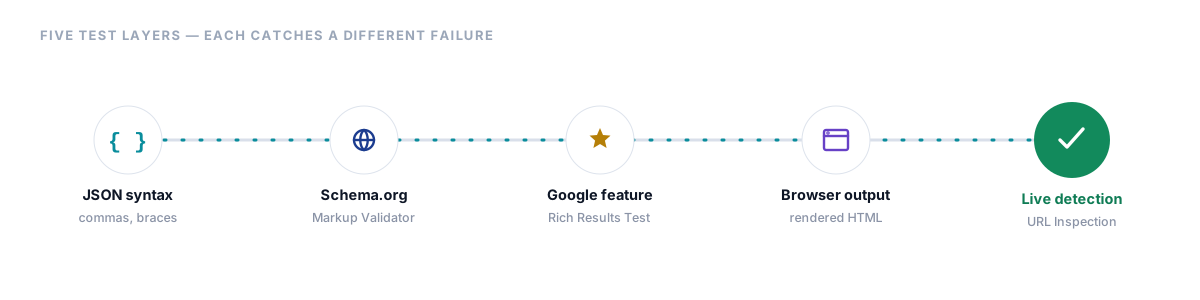
Schema markup testing needs separate tools for separate failure types. One passing result cannot confirm the complete setup quality. Follow every layer before releasing a wider template update. Record each result beside its tested page.
Check JSON Syntax
Check commas, braces, quotation marks, arrays, and value types. Broken syntax can prevent every later property check.
Check Schema.org Types and Properties
Schema Markup Validator reads JSON-LD, RDFa, and Microdata graphs. It identifies syntax errors and displays the extracted Schema.org entities. The validator can also inspect markup added through JavaScript.
Check Google Feature Qualification
Rich Results Test checks markup for supported Google Search features. It reports blocking errors and optional improvement warnings. A passing result supports qualification without promising display.
Example error
- Error: Missing field
offers - Affected item: Product
- Cause: The Product node contains no current Offer
- Correction: Add one Offer using visible price and currency
Inspect Final Browser Output
Open the final page after every script finishes. Search for JSON-LD added through plugins, apps, or Tag Manager. Compare final values against visible page content. Count duplicate primary entities and stable IDs. Repeat that inspection across several representative website templates.
Inspect the Live URL
URL Inspection compares the indexed and live page versions. It can show detected schema items, warnings, errors, and access status. The tool also provides rendered HTML for successful tests.
Schema Markup Validator checks types, properties, and extracted entities. Rich Results Test checks Google feature qualification. URL Inspection checks live and indexed Google detection. Search Console reports track issue patterns across indexed samples.
Fix Schema Markup Errors in Priority Order
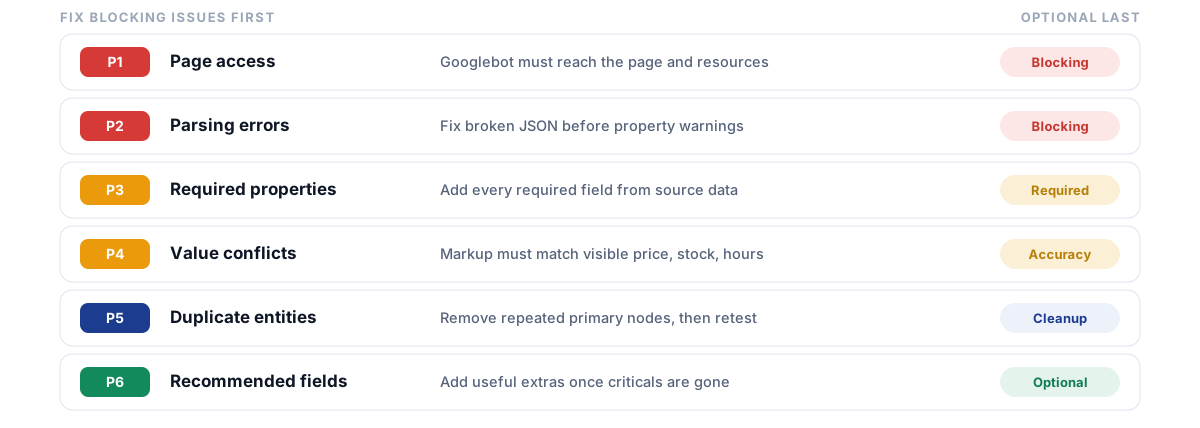
Fix blocking errors before adding optional properties or extra entities. Begin with page access, then syntax, requirements, content accuracy, and duplicates. Add recommended fields after every blocking error disappears.
Priority 1: Page access
Confirm that Googlebot can access the full page. Remove unwanted login restrictions from public content pages. Check robots.txt rules and unwanted noindex directives. Confirm successful server responses during live tests. Google cannot process markup from inaccessible pages.
Priority 2: Parsing errors
Fix broken JSON before reviewing property warnings. Common failures include commas, braces, quotes, arrays, and references. Search Console treats every Unparsable report issue as blocking, and one broken template can affect many pages.
Priority 3: Required properties
Open the current documentation for the selected feature. Add every required property from accurate source data.
Priority 4: Visible value conflicts
Correct prices, stock states, addresses, hours, reviews, authors, and dates. Hidden or misleading markup can block feature qualification. Dynamic values should match visible values and customer actions. One database should power every changing commercial field.
Priority 5: Duplicate entities
Remove repeated primary nodes with conflicting identifiers or values. Retest all connected supporting entities after removal.
Priority 6: Recommended properties
Add accurate recommended fields after critical issues disappear. Optional warnings can still highlight useful extra details.
Fix one issue across every affected template before requesting a fix check. Google starts the fix check with sample pages before broader checking.
Release a Small Sample and Confirm Detection
Publish representative pages before applying schema across every template. A controlled sample finds template and data problems early.
Include a standard article and one multi-author article. Include one product, variant product, and unavailable product. Include one branch and another branch with seasonal hours. Each sample should cover a different template or product state.
Complete every planned development test before publication. Publish only the selected sample pages first. Test each live URL after deployment and cache clearing finish. Compare the indexed and live page versions. Correct all template problems before the wider release.
Google recommends publishing several marked pages before broader rollout, then running live URL checks after publication.
Search Console may take time before showing new items. Missing items can reflect crawling, access, parsing, or indexing problems. Search Console rich-result reports contain indexed page samples, so report sampling can also hide some detected schema items.
After corrections, open the issue report and start Validate Fix. Search Console first checks a sample of affected pages. Status can move from Started to Looking good, then Passed. Validation may require about two weeks or longer.
A successful sample supports a broader template release. Continue checking new page patterns during later releases.
Monitor Markup After Website Changes
Schema accuracy can break after technical or business changes. Each relevant change should trigger another targeted markup review. Monitoring should focus on affected templates and changing values.
Technical triggers include theme updates, plugin updates, and CMS migrations. Template edits, JavaScript releases, and caching changes also require testing.
Business triggers include price, stock, branch, and hours changes. Author updates can alter article identity and profile relationships. Return-policy updates can change Offer or Organization details. Review-system updates can alter rating and review data.
Google triggers include feature retirements and property requirement revisions. Search Console report changes can expose different issue patterns. Official instruction updates may change supported values or feature access. Check official documentation before large schema projects. Record the last review date within the ownership file.
After each trigger, test one affected page first. Inspect final browser output and compare visible values. Review Search Console after Google recrawls the sample.
Google recommends testing during development and monitoring after deployment, because template or serving changes can break markup after a successful release.
Each monitoring trigger should connect with one named owner. Changes without owners can create stale or conflicting schema data.
Measure Schema Work Without Unsupported Claims
Measure setup quality separately from Search and business outcomes. Shared timing cannot prove that schema caused later performance changes.
Setup ledger
Track valid template coverage across each important page type. Count every removed duplicate main entity across templates. Record corrected critical errors and data mismatches. Track live URLs where Google detected eligible items. Record Search Console fix outcomes and dates.
Search outcome ledger
Track rich-result impressions and clicks where reports provide those dimensions. Review click-through rate across comparable periods and page groups. Track indexed page counts and merchant listing coverage. Measure conversion changes through separate analytics reports.
A release may coincide with traffic, ranking, or conversion changes. Other website, market, and Search changes can influence those outcomes. Report the timing without assigning unsupported causes.
Google states that schema manual actions remove rich-result qualification, though affected pages can still appear through standard Google Search results.
Remove claims promising rankings, rich results, traffic, or AI citations. Avoid minimum schema counts or claims favouring more markup automatically.
Setup reports should show accuracy, coverage, ownership, and fix status. Performance reports should show observed Search and business results separately.
Schema Markup for SEO Checklist
Complete these six phases before publishing markup across any template. Finish each phase before moving to the next phase. Repeat affected phases after major website changes.
Inspect
- Find current schema markup.
- Trace every output owner.
- Compare visible and coded values.
Choose
- Define the main purpose of the page.
- Name the main entity.
- Check current Google support.
- Select the narrowest accurate type.
Map
- List visible page fields.
- Add every required property.
- Add accurate recommended properties.
- Name every update owner.
Add
- Select one primary output system.
- Connect verified database values.
- Add stable entity identifiers.
- Remove conflicting output sources.
Test
- Check JSON syntax.
- Use Schema Markup Validator.
- Use Rich Results Test.
- Inspect the final browser output.
- Inspect the live URL.
Monitor
- Review Search Console reports.
- Validate corrected issue groups.
- Retest after website changes.
- Report setup results separately.
Approve the setup after access, accuracy, identity, testing, and ownership checks. Recheck affected templates after technical or business changes. Teams that want schema and entity work handled together can explore our entity SEO services.
Frequently Asked Questions
What Is Schema Markup for SEO?
Schema markup labels page entities and visible facts through code. Schema.org supplies the shared list of types and properties. Google may use qualifying markup for an enhanced Search appearance.
Does Schema Markup Improve Rankings?
Schema markup carries no direct ranking guarantee from Google. Accurate markup can help Google read pages and qualify richer results.
Which Schema Type Should I Use?
Choose the narrowest accurate type matching the primary subject of the page. Check current Google support before approving any feature. Review available Schema.org subtypes after confirming page purpose. Add supporting entities only where visible relationships exist.
Where Should JSON-LD Go?
JSON-LD can appear within the HTML head or body. Place it on the page describing the selected entity. Dynamic values should come from visible website data sources.
Can Several Schema Types Appear Together?
Several related types can describe connected entities on one page. Product can connect with Offer and Brand. BlogPosting can connect with Person and Organization. Problems appear when several primary nodes describe one entity differently. Compare identifiers and changing values before approving multiple nodes.
How Do I Find Duplicate Schema?
Search initial and final HTML for repeated primary types and identifiers. Compare output sources, dates, prices, addresses, ratings, and other changing values.
Which Tool Should Test Schema?
Schema Markup Validator checks Schema.org types, properties, and extracted entities. Rich Results Test checks current Google feature qualification. URL Inspection shows live and indexed Google detection. Search Console reports monitor issue patterns across page samples.
Why Is Schema Missing From Search Console?
Google may need another crawl after the latest page change. Unindexed, blocked, or unparsable pages remain absent from reports. Search Console also displays sampled items across indexed pages.
Does Valid Schema Guarantee Display?
Valid schema can help a page qualify for a Google rich result. Google still chooses the final result appearance for each query.

Manish Singh is Head of Generative AI at SEO Noida and has 14+ years of experience in SEO, UX, and digital marketing. He focuses on how Google and AI platforms find, interpret, and cite web content. His articles cover AI SEO, GEO, AEO, LLM SEO, entity optimization, content architecture, and visibility measurement, drawing on website audits and campaign work.